
What Is Virtual Staging? Meaning, Prices and the Rules
By PROMOREALTOR · Updated · 13 min read
Virtual staging is furniture and decor added to a photo of a room, by a designer or an AI, instead of to the room itself. It is cheap and fast, it helps buyers read an empty space, and in more and more markets it has to be labelled. This guide covers what it is, what it costs, when it works and how to use it without misleading anyone.
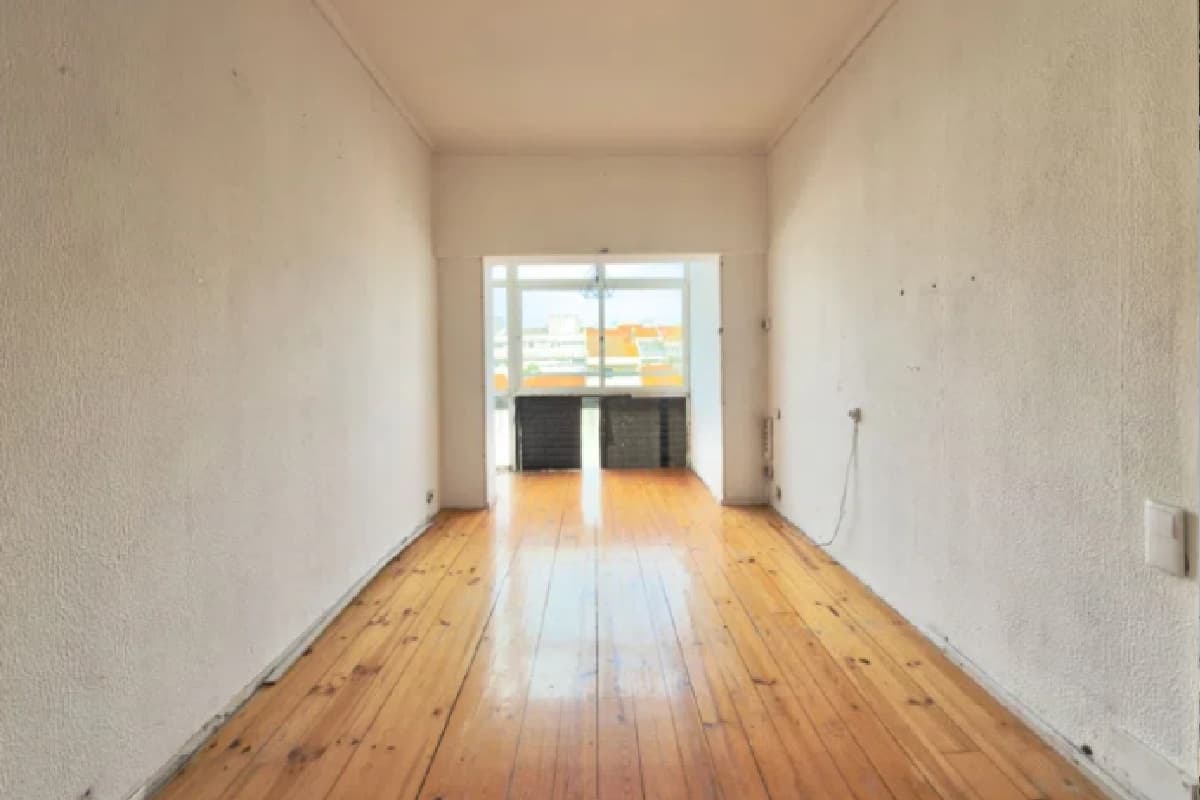 Before
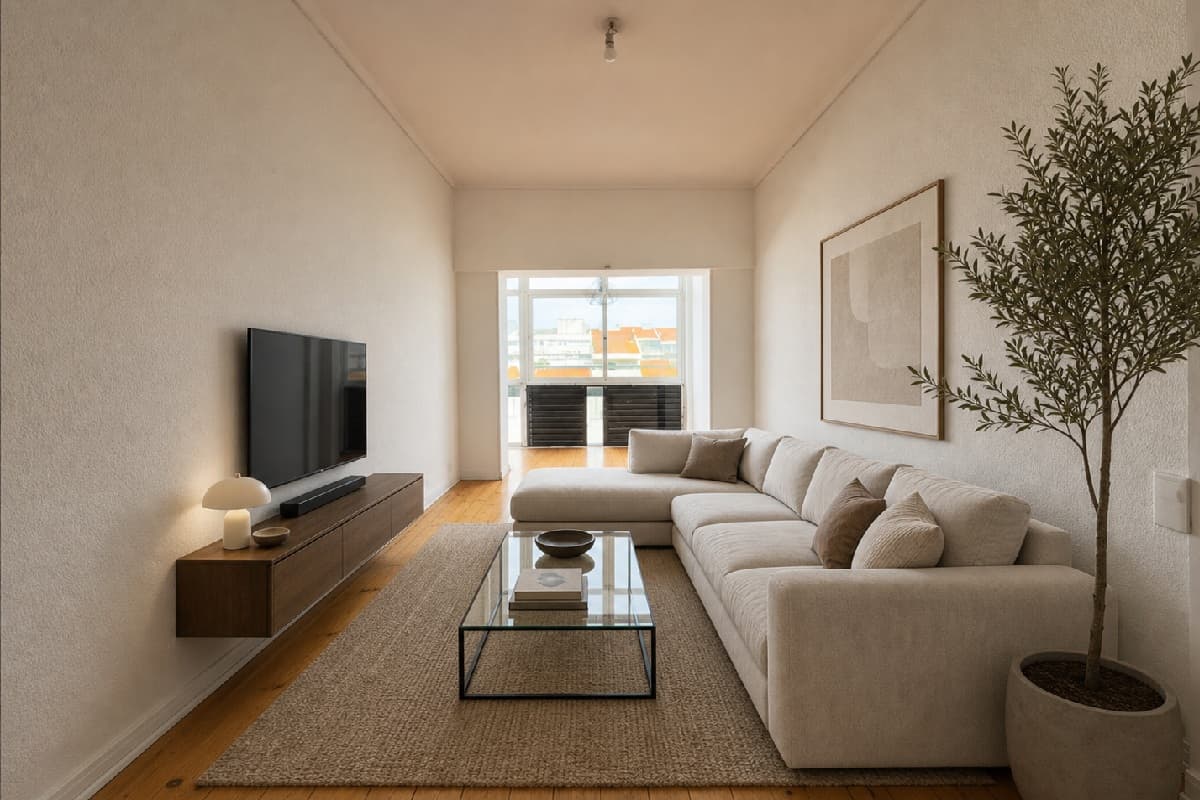 After
Virtual staging in one paragraph
You photograph an empty room. Before the photo goes into the listing, a designer or an AI adds a sofa, a rug, a bed or a dining table, in a style that suits the buyer you expect. The result looks like a furnished room. The real room is still empty, and the walls, floor, windows and light in the photo are still the real ones.
That is the whole idea. Physical staging rents real furniture and moves it into the home. Virtual staging only changes the picture, so it costs a fraction and takes minutes or a day instead of a week.
The term is also used for related edits: restyling a furnished room, removing furniture first, or adding plants and decor to a bare render. Strictly, staging adds; removing is decluttering. They are different jobs, and the rules treat both as alterations in some markets 7.
How it works
There are two ways to get a staged photo today.
A human designer
You upload the photo to a service, pick a style and wait. A designer builds the furniture into the scene in 3D or by compositing. Styldod, for example, lists $23 an image, or $16 once you order 8 or more, delivers in 24 to 48 hours, and charges $6 or $12 extra an image for faster delivery 1. You get revisions and a person who understands scale.
An AI tool
You upload the photo, pick a style and press a button. An image model furnishes the room in seconds to a minute. Pricing is usually a monthly plan: Virtual Staging AI runs from $16 a month for 6 images to $79 for 150 2. Some tools charge per image instead, such as Fotello at $1 a staging 3.
AI is fast and cheap, but it is generated. It can quietly change things you did not ask it to change: clean a stain off a wall, straighten a crooked window frame, add a ceiling light. Checking the result against the original is part of the job, whoever does the staging.
Virtual staging vs physical staging
The two do the same job for a buyer scrolling a portal: they make a room easy to read. They differ in almost everything else.
| Virtual | Physical | |
|---|---|---|
| What changes | The photo only | The room: real furniture is moved in |
| Typical price | About $0.50 to $30 a photo 21 | Average $1,846, normal range about $830 to $2,917 4 |
| Time | Seconds (AI) to 1 or 2 days (designer) 1 | Days to plan, deliver and remove |
| Helps at a viewing | No: the room is empty in person | Yes: buyers walk through it |
| Labelling | Required by some MLSs and in California 79 | Not needed: what you see is there |
| Best for | Empty rooms, quick listings, restyling options | High-value homes with many in-person viewings |
Chase's May 2026 guide puts the first month of physical staging for an empty home at $2,000 to $3,000 or more, because the stager brings every piece of furniture 5. For an empty flat that is the gap virtual staging fills: the photos look furnished for the price of a few lunches.
What it costs
A quick guide to the price of one staged photo, from the vendor pages we read:
- Human designer: about $16 to $30 an image. Styldod lists $23, or $16 at 8 images or more 1.
- AI on a monthly plan: Virtual Staging AI is $16 a month for 6 images ($2.67 each if you use them all) up to $79 for 150 ($0.53 each) 2.
- AI per image: Fotello lists $1 a staging 3. PROMOREALTOR charges 1 credit (€1) a photo, with no subscription.
A monthly plan is only cheap if you use it. An agent who stages two rooms a month pays more per image on a plan than on a per-image price. The full price comparison works through the numbers listing by listing.
Does staging help a home sell?
This is the number everyone quotes, so it is worth reading carefully. In NAR's 2025 staging survey, 83% of buyers' agents said staging makes it easier for a buyer to picture the home as theirs. 49% of sellers' agents said it cut time on market, 30% slightly and 19% a lot. 29% of sellers' agents said it raised the offers they got by 1% to 10%, and 17% of buyers' agents saw a 1% to 5% rise 6.
Look at who answered. NAR invited 49,806 Realtors and got 1,266 usable replies, a 2.5% response rate 6. These are opinions of agents who chose to reply, and the survey is about staging in general, not virtual staging in particular. It tells you agents believe staging helps buyers. It does not prove that one staged photo adds a set amount to a sale.
The honest case for virtual staging is narrower and easier to defend. An empty room photographs badly: a buyer cannot tell its size or use, and a portal shows the first few photos only. A furnished picture fixes that cheaply. Whether it changes the price is up to the market.
When virtual staging works, and when it does not
Good uses
- Empty flats and new builds, where every room photographs as bare walls.
- One or two key rooms, such as the living room and the main bedroom, in an otherwise furnished home.
- Showing what a room can be used for: a spare room as an office, a box room as a nursery.
- A dated but clean room, restyled so the buyer can see past the furniture.
Bad uses
- Hiding damage, damp, cracks or anything a buyer must be told about.
- Changing the building itself: walls, floors, cabinets, windows or the view.
- Furniture that would not fit the real room, which misleads on size.
- A staged photo with no label where your MLS or law requires one.
One test covers most cases: if the buyer walks in and the room is what the photo showed, minus the furniture, you staged it. If anything else is different, you altered the property.
The rules: label it and keep the original
Most markets have no specific rule yet, but the direction is clear and the US is moving first. California's AB 723 has applied since 1 January 2026: brokers and salespeople must disclose digitally altered images in real estate ads and point to a public place where buyers can see the original 9.
CRMLS, California's largest MLS, treats virtual staging as an alteration. It asks for a label such as "virtually staged" in the photo description and the unaltered original right before or after the edit. A violation gets a warning first, then a $250 fine if it is not fixed 7. ARMLS in Arizona has required a disclosure of digitally altered images since 28 May 2026, and lists adding furniture as one 8.
Detection is arriving too. A Coraly study of about 40,000 primary listing photos on four big US portals found about 11% showed signs of alteration, Redfin had the highest rate of virtual staging at 17.7%, and more than 90% of the altered photos carried no visible disclosure 9.
Outside the US, check your portal's and your country's advertising rules. The safe habit is the same everywhere: label every staged photo, and keep the empty original. The disclosure guide has the full table of what counts as altered, and label wording you can copy.
How to stage a room virtually, step by step
- Shoot the room empty and straight. Level camera, verticals straight, lights on, from a corner that shows the floor. Staging cannot fix a bad photo; fix perspective and light first if you need to.
- Pick the rooms that matter. The living room and the main bedroom do most of the work on a portal. Staging every cupboard adds cost and little else.
- Choose one style for the whole listing. Match the buyer: clean and modern for a city flat, warmer and family-sized for a house. Mixed styles across rooms look odd in a gallery.
- Run it and check it against the original. Walls, floor, windows, doors, light fittings and the view must match. The furniture must sit on the floor, cast believable shadows and fit the room.
- Label it and upload the original beside it where your MLS asks for it, and keep every original in the listing's folder.
If the room still has furniture you do not want, empty it first and stage the emptied photo. The furniture removal guide covers that step.
Common mistakes
- Furniture that is too big or too small. A sofa that would block the door, or a tiny bed in a big room. Scale is the first thing a buyer notices in person.
- Accepting changes you did not ask for. AI tools sometimes clean walls, add light fittings or change the floor. Compare before you publish.
- Staging over a problem. A rug placed over a damaged floor is a complaint waiting to happen.
- No label. In California and at several MLSs this is a rule, not a courtesy 78.
- Only staged photos. Buyers who see only furnished pictures and then walk into an empty flat feel misled even when everything was labelled. Show the empty original too.
Where PROMOREALTOR fits
PROMOREALTOR is an AI tool for the "AI per image" row above. Upload a photo of an empty room, pick a style and press RUN: the room is furnished in about 60 seconds for 1 credit (€1), with no subscription. Nine styles restyle a furnished room, Empty This Room clears one first, and a failed edit is refunded automatically.
It has the same limits as every AI tool: check each result against your photo, and label it. The "Mark as edited with AI" option puts a label on the image, but at CRMLS you still need the description label and the original beside it 7.
Frequently asked questions
Is virtual staging legal?
Yes, in general, as long as it does not misrepresent the property. Some markets require a label: California's AB 723 since 1 January 2026 9, and MLSs such as CRMLS and ARMLS have their own rules 78.
Is virtual staging the same as photo editing?
No. Editing improves the same photo: light, colour, sharpness, straight lines. Staging adds things that are not in the room, which is why many rules treat it as an alteration and ask for a label 7.
How much does virtual staging cost?
From about $0.50 to $3 a photo with AI tools 23 and about $16 to $30 with human designers 1. PROMOREALTOR is €1 a photo.
Does virtual staging work for occupied homes?
It can restyle a furnished room, or a room can be emptied first and then staged. Both change what the photo shows, so label them.
Sources and how we checked
Prices and rules were read on the pages linked below on 2026-10-09. Vendors change prices often and some pages localise by country, so confirm on the vendor's page before you buy. Several price comparisons online are written by vendors; we use vendor pages for vendor prices and say when a figure comes from a vendor's own blog. This guide is information, not legal advice.
- Styldod: Virtual staging pricing Prices shown in $.
- Virtual Staging AI: Pricing Prices shown in $, currency not named.
- Fotello: Pricing Currency not named.
- HomeAdvisor: How much does it cost to stage a house? Page updated June 2026; average $1,846.
- Chase: Cost to stage a house (May 2026)
- NAR: Report reveals home staging boosts sale prices and reduces time on market (6 May 2025) Survey of agents, not measured sales.
- CRMLS: Digitally Altered Image Guidance and FAQs (California AB 723 and CRMLS Rule 11.5.2) California Regional MLS knowledge base.
- ARMLS: Virtually Staged Photos (Disclosure of Digitally Altered Images, from 28 May 2026) Arizona Regional MLS.
- Real Estate News: How should MLSs, portals address AI-enhanced listing photos? (18 June 2026) Reports the Coraly Q1 2026 study.
Keep going
Virtual staging
Furnish an empty room from a photo in about 60 seconds, or restyle an occupied one in nine styles. €1 a photo, no subscription.
Virtual staging cost
Virtual staging prices checked on vendor pages: human designers $16 to $30 a photo, AI from about $0.50, physical staging in the thousands, and hidden costs.
Staging before and after
Real before and after virtual staging results: what the AI changed, what it quietly fixed, and a seven-point check before you publish, with disclosure rules.
AI photo disclosure rules
California AB 723, CRMLS and ARMLS rules for AI-edited and virtually staged listing photos: what counts as altered, what to label, and how to keep originals.