
Do You Have to Disclose AI-Edited Listing Photos? AB 723 and MLS Rules
By PROMOREALTOR · Updated · 13 min read
Often, yes. California's AB 723 has applied since 1 January 2026, CRMLS and ARMLS publish their own rules, and the line between a harmless fix and an alteration is exactly where agents get caught. This guide shows what the rules say, what is still unclear, and a routine that keeps you safe.
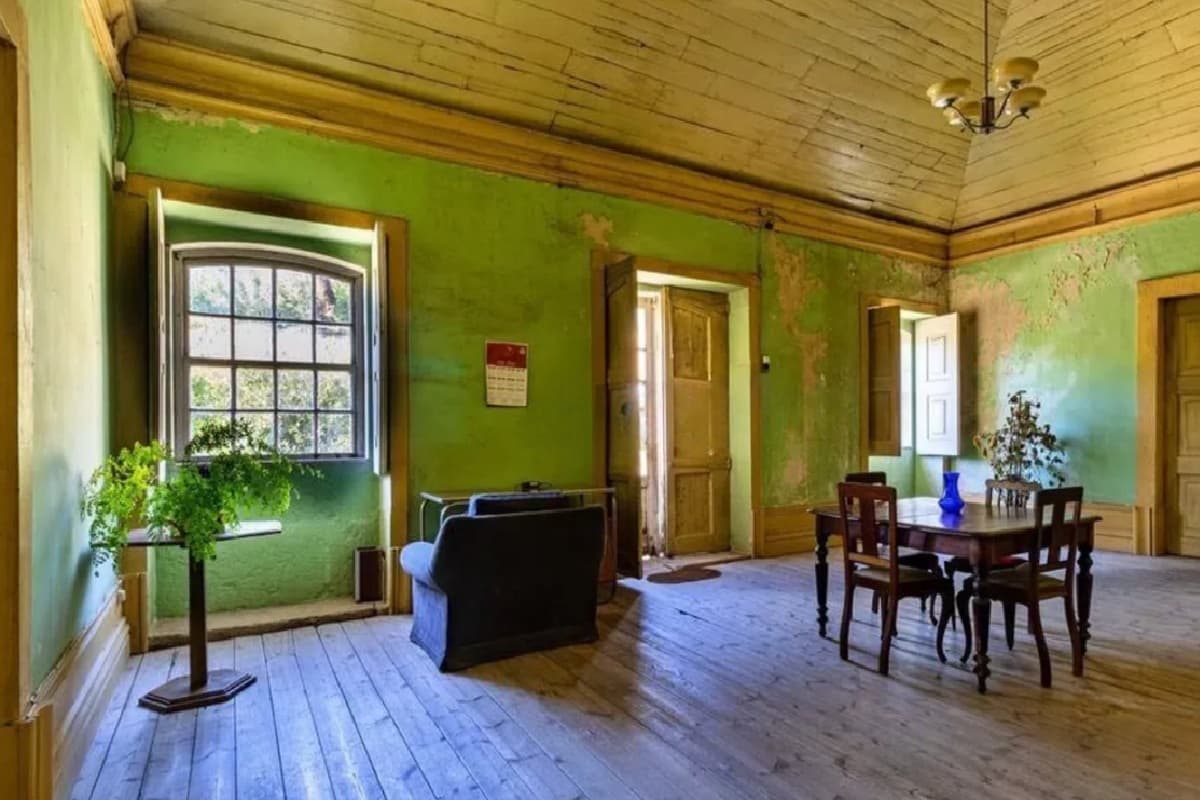 Before
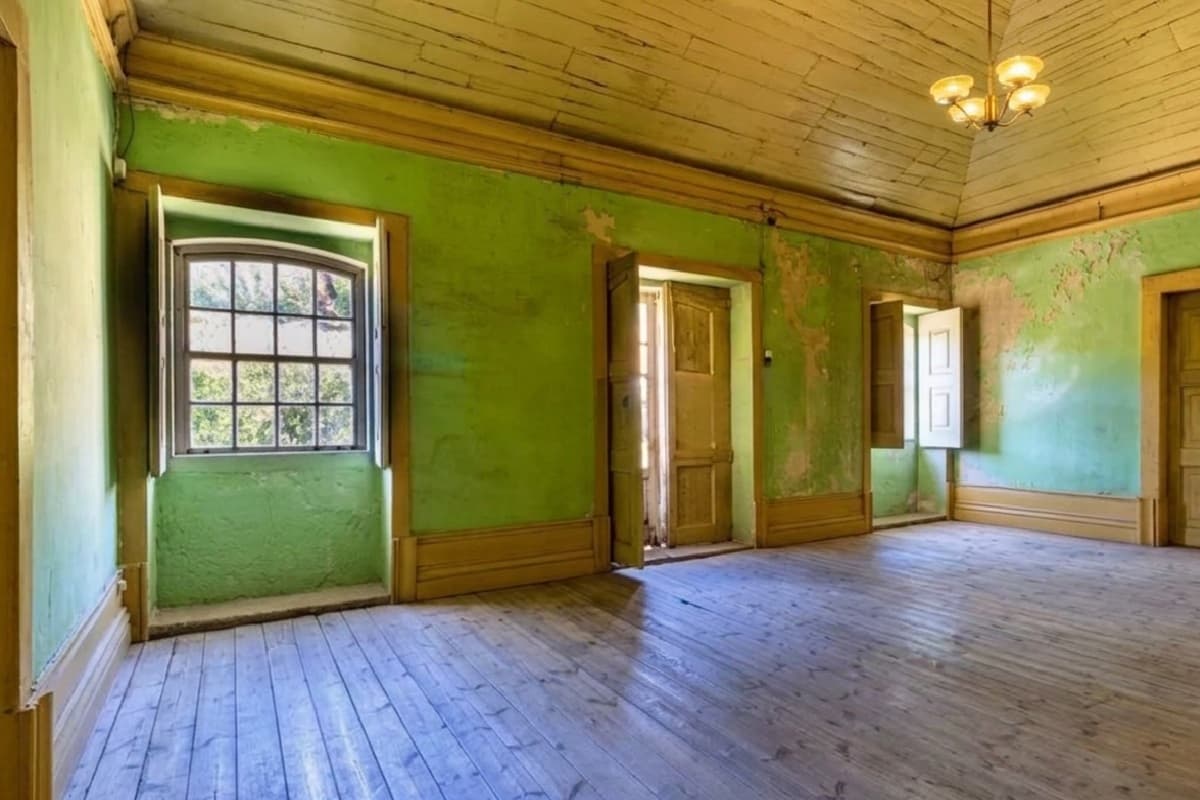 After
AfterThe short answer
You've just staged the living room and you're about to upload it to the MLS. Do you need a label?
Use this test. If the edit only makes the same photo cleaner, you generally don't. If it changes what the property looks like, you do. That is the line the California Regional MLS (CRMLS) and the Arizona Regional MLS (ARMLS) draw, and California law now backs it up.
AB 723 requires licensed California brokers and salespeople to disclose digitally altered images in real estate advertising, and to point to a public place where the original can be seen 4. Several boards add stricter rules of their own. A photo can break an MLS rule without clearly breaking state law.
What AB 723 and CRMLS Rule 11.5.2 say
AB 723 and CRMLS Rule 11.5.2 both took effect on 1 January 2026. CRMLS defines a digitally altered image as one made by or for a broker or salesperson and changed with editing software or AI, for example by adding, removing or changing elements such as furniture or appliances. It names AI tools like REimagineHome as covered 1.
The responsible person is the broker or salesperson, or someone acting for them. In practice that's the listing agent. The San Francisco Association of REALTORS says the duty currently rests with the Broker of Record, specifically the agent on the listing agreement 3.
What you must do at CRMLS
- Label the image in the photo description with a term such as "digitally enhanced", "digitally altered" or "virtually staged".
- Put the unaltered original in the listing immediately before or after the altered image.
- If a tool adds its own watermark, still say in the description and next to the original that the photo is enhanced. A watermark alone isn't enough 1.
CRMLS adds a rule of thumb worth remembering: if you can't tell whether an image counts as altered, err on the side of caution and disclose it 1.
What counts as a normal fix
CRMLS allows common edits as long as they don't change how the property is represented: lighting, sharpening, white balance, color correction, angle, straightening, cropping and exposure 1. ARMLS says it in fewer words: brightness, contrast, color, cropping or sharpening are not considered altered 2.
What counts as altered: a working table
This puts the edits agents ask about next to what CRMLS and ARMLS say. "Not addressed" means we didn't find it in the pages we read. It does not mean it's allowed.
| Edit | What the sources say | Our advice |
|---|---|---|
| Brightness, exposure, white balance, color correction, sharpening, cropping, straightening | Not altered at CRMLS or ARMLS 12 | No label needed |
| Virtual staging (adding furniture) | Allowed with a label and the original beside it at CRMLS. Adding furniture is altered at ARMLS 12 | Label "virtually staged" and add the original |
| Removing furniture or clutter | At CRMLS, virtually clearing furniture that won't stay with the property is altered. A San Francisco REALTORS guide lists decluttering unattached items among the permitted edits 13 | The sources conflict. Follow the stricter one: label it and add the original |
| Removing outdoor objects such as trash cans | Altered at ARMLS 2 | Label it |
| Removing power lines or wires | Not permitted at CRMLS under the Truth in Advertising rules 1 | Don't do it in listing photos |
| Changing wall color, flooring, cabinets, wall size | Not permitted at CRMLS 1 | Don't do it in listing photos |
| Landscaping changes or AI-generated landscaping | Not allowed unless the seller will make those changes as part of the listed price, and AI-generated landscaping is prohibited in the MLS even if labelled 1 | Don't do it in MLS photos |
| Sky replacement | Not addressed in the CRMLS FAQ we read, and press guides disagree. Coraly counts it as an alteration 14 | Disclose it |
| Day to dusk (twilight from a daytime photo) | Not addressed in the pages we read. It changes sky and light | Disclose it |
Other boards: ARMLS, New York and the portals
ARMLS has required a Disclosure of Digitally Altered Images since 28 May 2026 for altered photos added in Flexmls. Its examples of altered interiors include adding furniture, an accent wall color, removing items, adding a fire to a fireplace and adding architectural details. Altered exteriors include adding patio furniture, improving pool features, enhancing landscaping and removing objects such as trash cans 2.
Elsewhere the picture is patchy. NAR's Code of Ethics Article 12 tells Realtors to present a true picture in their advertising, but it doesn't mention AI or disclosure 4. The New York Department of State issued a consumer alert in late 2025 warning that AI images can misrepresent properties and reminding licensees that ads must be accurate. It didn't require a disclosure 4.
Label wording varies too. Some boards want it in the photo caption, others in agent remarks or on the first photo. Check yours. If you list in more than one market, one label won't satisfy every board.
Why this is getting enforced
In the first quarter of 2026, Coraly looked at about 40,000 primary listing photos from the four major portals. About 11% showed signs of alteration. Of those, 90% changed the exterior or the surrounding landscape and 69% involved sky replacement. Redfin had the highest rate of virtual staging, at 17.7%. And more than 90% of the altered primary images carried no visible disclosure 4.
San Diego MLS worked with Coraly on a tool that scans every image at upload, flags likely AI alterations and matches them to the unaltered originals, with a public proof page for each listing 4. Expect other boards to follow. The practical upshot: an edit nobody noticed in 2025 can be flagged automatically in 2026.
A disclosure routine that works
- Keep every original. Save the untouched files in a folder named for the listing. You'll need them for the adjacent upload.
- Sort each edit. Normal fix, or alteration? Use the table above and your MLS rules.
- Label it in the description. Use words your MLS accepts: "virtually staged", "digitally altered" or "digitally enhanced".
- Upload the original next to the edit if your MLS asks for it (CRMLS does), or give a public link or QR code to the original where the rule allows it 3.
- Put it in your contracts. Ask photographers and vendors to hand over unaltered originals and to tell you what they changed. Coraly recommends the same 4.
- When in doubt, disclose. A label is free. A $250 fine and a call from compliance cost more 1.
Label wording you can copy
CRMLS accepts clear terms such as "digitally enhanced", "digitally altered" or "virtually staged" in the photo description 1. Your MLS may set its own wording, so check first. These work as starting points:
- Virtually staged. The unaltered photo is shown next.
- Digitally altered: furniture removed. The unaltered photo is shown next.
- Digitally altered: sky replaced. The unaltered photo is shown next.
- Digitally enhanced: lighting and color corrected.
Name what you changed. "Digitally altered" tells a buyer very little. "Furniture removed" tells them what to expect.
A short policy for your team
- Every listing keeps its untouched originals in one folder.
- Every edit that adds, removes or changes an element gets logged: what, by whom, with which tool.
- Alterations are labelled in the photo description before the listing goes live.
- The unaltered original goes up beside the altered image wherever the MLS requires it.
- Nobody changes walls, floors, cabinets, landscaping or utility lines in MLS photos.
- When in doubt, the listing agent asks the broker before publishing.
A vendor clause to add
Coraly recommends adding AI-disclosure terms to agent and vendor contracts 4. A plain version for photographers and editors: "The vendor delivers the unaltered original files with every edited set and lists each alteration made, such as virtual staging, object removal and sky replacement. The vendor does not alter walls, floors, fixtures, landscaping or utility lines."
What is still unclear
- Sky replacement and day to dusk. Neither the CRMLS nor the ARMLS page we read covers them, and sources disagree. Disclose.
- Removing unattached items. One San Francisco guide treats it as exempt 3, while CRMLS treats virtual clearing as altered 1.
- The statute text. We cite MLS guidance and press coverage, because we couldn't retrieve the statute itself.
- Other states and portals. New York has issued a consumer alert only, and the sources we read don't describe the portals' own rules 4.
Rules are moving fast. A tool, a vendor or a guide like this one can be out of date within a quarter. Check your MLS rulebook each time you hire a new editor.
How this affects the tools you use
Every AI editor runs into these rules, ours included. Against the table above, PROMOREALTOR's tools fall like this.
- Normally fine as fixes: Enhance and Sharpen, Fix Perspective, Lens and Distortion Fix, Relight Interior. Check that the edit doesn't change how the property is represented.
- Alterations to label: Virtual Staging, Interior Style Transformation, Empty This Room, Declutter This Room, Declutter Exterior, Add Blue Sky, Change Time.
- Not for MLS listing photos in California: Garden Fix, Restoration of Ruins and Renovation change what the property is. Use them for concept visuals or marketing material, and say so.
PROMOREALTOR has a "Mark as edited with AI" option that puts an "Edited with AI" mark on the image. It helps, but at CRMLS a watermark alone isn't enough: you still need the description label and the original beside the edit 1. An edit is saved as a new file and your original is never replaced, so keep it for the adjacent upload.
Frequently asked questions
Does AB 723 apply outside California?
AB 723 is a California law, so it applies to California licensees and listings. Other states and boards have their own rules, or none. ARMLS in Arizona, for example, has its own disclosure from 28 May 2026 2.
Do I need to disclose sky replacement?
The CRMLS FAQ we read doesn't cover it, and the sources disagree. Coraly counts sky replacement as an alteration, and 69% of the altered photos it found involved one 4. The safe move is to disclose it.
Is a watermark enough?
Not at CRMLS. Even when a tool adds a watermark, you still state the enhancement in the description and put the original next to the edit 1.
What happens if I don't disclose?
At CRMLS a violation first gets a warning, then a $250 fine if you don't fix it in time 1. Your broker or state regulator may add consequences of their own.
Is virtual staging still allowed?
Yes, with a label and the original in the listing at CRMLS. Many other boards allow it with a label too. Check yours.
Sources and how we checked
Prices and rules were read on the pages linked below on 2026-10-09. Vendors change prices often and some pages localise by country, so confirm on the vendor's page before you buy. Several price comparisons online are written by vendors; we use vendor pages for vendor prices and say when a figure comes from a vendor's own blog. This guide is information, not legal advice.
- CRMLS: Digitally Altered Image Guidance and FAQs (California AB 723 and CRMLS Rule 11.5.2) California Regional MLS knowledge base.
- ARMLS: Virtually Staged Photos (Disclosure of Digitally Altered Images, from 28 May 2026) Arizona Regional MLS.
- San Francisco Association of REALTORS: Digitally Altered Images (AB 723) A member guide, not the statute text.
- Real Estate News: How should MLSs, portals address AI-enhanced listing photos? (18 June 2026) Reports the Coraly Q1 2026 study.
Keep going
Virtual staging
Furnish an empty room from a photo in about 30 seconds, or restyle an occupied one in nine styles. €1 a photo, no subscription.
Decluttering
Remove furniture, clutter, cars and bins from listing photos in about 30 seconds. €1 a photo, no subscription, no editor to learn.
Virtual staging cost
Virtual staging prices checked on vendor pages: human designers $16 to $30 a photo, AI from about $0.50, physical staging in the thousands, and hidden costs.
Photo editing
Replace the sky, fix perspective, relight, declutter and enhance listing photos in about 30 seconds. €1 a photo, no subscription, no editor to learn.
Edit fast, label right
Sign up, upload a photo and press RUN. Keep your original, label the edit.
Start free